AI workflow / Local video tool
Swap the actor. Keep the take.
Swap the person in a video and keep their performance. Genjutsu turns a clip into a colored depth silhouette over its own background, tucks the vocals inside, hands that to Seedance with a character reference, then puts the original soundtrack back on. I rebuilt the whole eleven step workflow to run on a Mac with nothing downloaded.
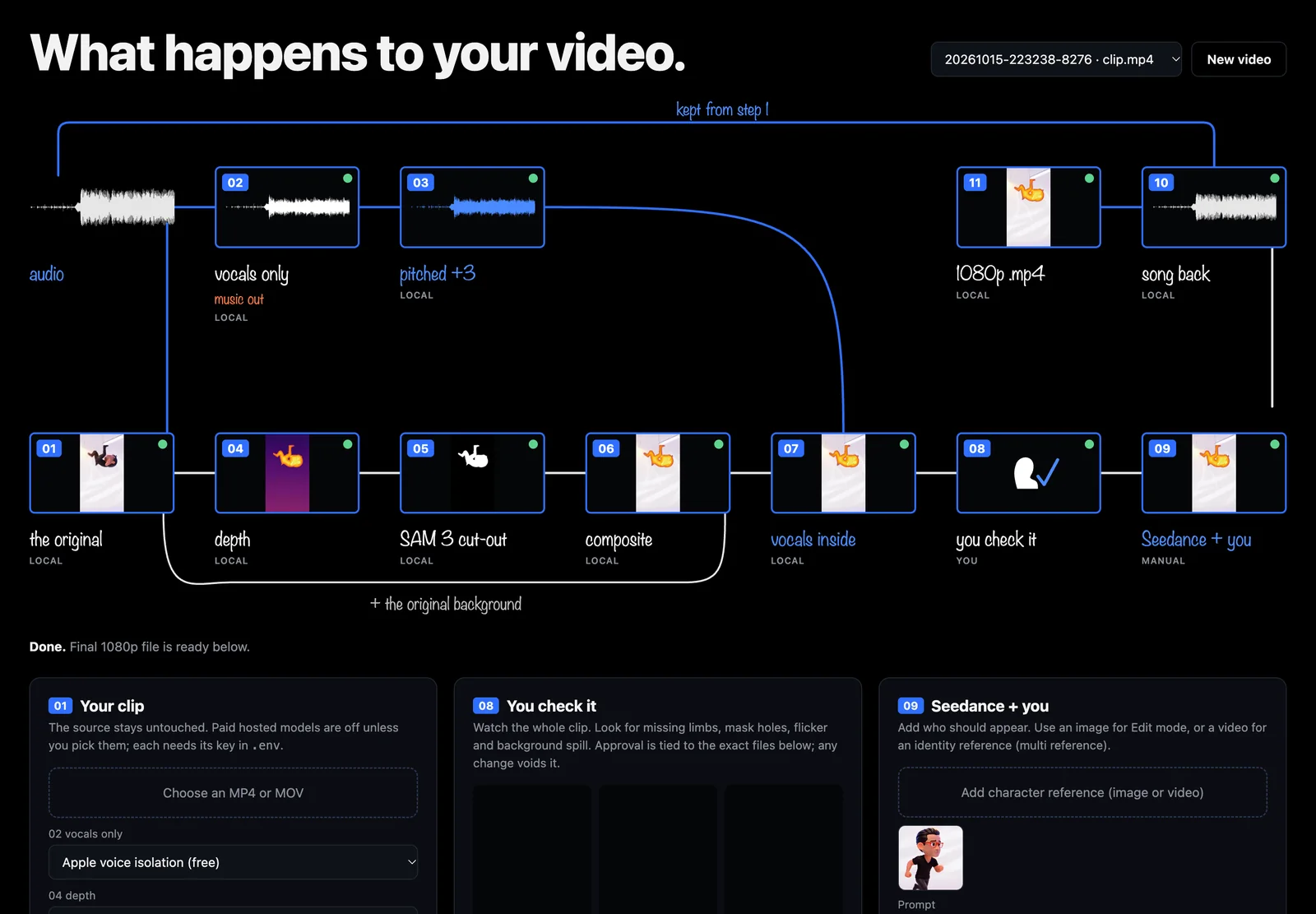
What happens to your video
Eleven steps, one review gate.
The diagram is the product. Every step writes a numbered file you can open, and nothing reaches Seedance until a person has watched the whole mask.
- 01
the original
The source is saved untouched. A 24 fps working copy and the original audio are pulled out of it.
- 02
vocals only
Voice is separated from the music bed. The music is set aside.
- 03
pitched +3
The vocals move up three semitones with the duration held exact, sample for sample.
- 04
depth
A colored depth pass of every frame: the subject glows, the room falls away.
- 05
SAM 3 cut-out
A mask per frame. Stray slivers on the frame edge are cleaned off.
- 06
composite
The depth subject is laid over the original background, so the scene stays real.
- 07
vocals inside
The pitched vocals are embedded in the composite. One file, no separate audio.
- 08
you check it
Three synced players and a per frame coverage strip. Approval is tied to the exact file hashes.
- 09
Seedance + you
Add a character image or video and the prompt. Generate in your own Seedance composer, or through the Enhancor API.
- 10
song back
The generated audio is thrown away and the full original soundtrack goes back on, bit for bit.
- 11
1080p .mp4
The final export at 1080p, with the soundtrack still untouched.
Built on the Mac
Same diagram. No downloads.
The original workflow calls hosted models for vocals, depth and masks. The brief here was to run it locally without pulling any model weights, so each hosted step got an adapter seam: the upstream model when a key is present, a built-in macOS stand-in when it is not. Every stand-in is labeled in the app, never swapped in silently.
| Step | Upstream model | On this Mac, free |
|---|---|---|
| 02 vocals only | Demucs on Replicate | Apple AUSoundIsolation, the high quality voice model already inside macOS, with its 132.6 ms delay measured and removed |
| 04 depth | Depth Anything video | Stand-in. Pseudo-depth from the mask's distance field plus luminance relief. It moves like depth, but has no true 3D shape |
| 05 cut-out | SAM 3 video, text prompt | Apple Vision person segmentation, or foreground instance masks when the prompt names something else |
| 09 Seedance | Enhancor Seedance 2.5 | Your own Seedance composer: download the step 07 file, generate, import the result |
| 11 1080p | Enhancor draft completion | Stand-in. Lanczos upscale of the draft |
Guardrails
Built so nothing expensive happens by accident.
Review is a gate
Approval stores a SHA-256 fingerprint of every mask, the composite and the Seedance input. Change one pixel and the approval is void.
Paid calls opt in
Hosted steps need a key plus two confirmations in the UI, one for the spend and one for the public upload. No paid request is ever retried on its own.
Soundtrack proven
The test run checks that the final file's audio packets hash to exactly the source's. The pipeline refuses to trim, loop or stretch audio to make a length fit.
Screens
The workflow you run.
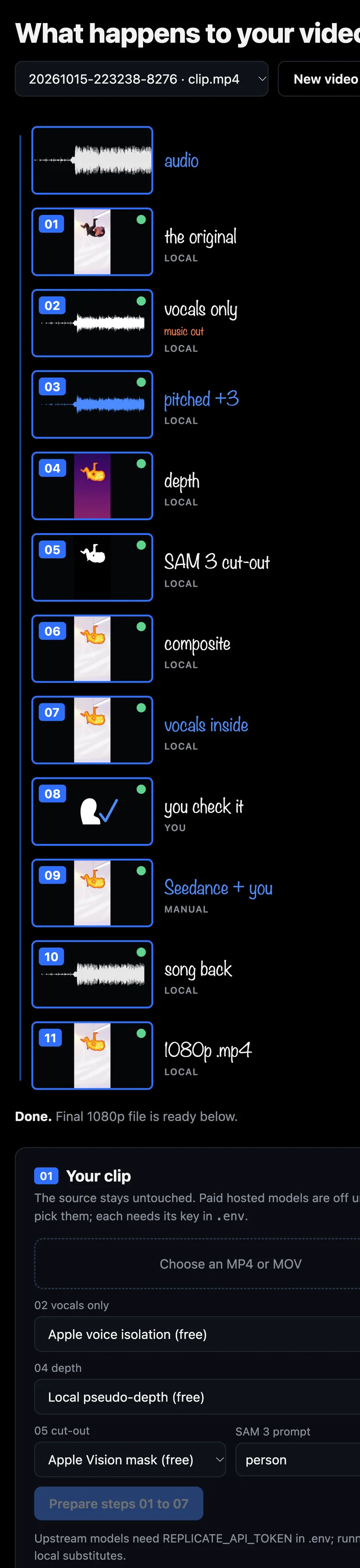
A local web app at 127.0.0.1. The diagram fills in with each step's real output as it runs; on a phone it becomes a single column.
Limits
What it does not do yet.
- Depth is a stand-in. Without a key, step 04 is shaped by the mask, not measured. A real depth model gives Seedance more structure to follow.
- The swap happens elsewhere. Seedance itself runs in your composer or on Enhancor. The local app prepares the input and finishes the output.
- Masks merge subjects. Vision can pick people or every salient object, but cannot select one thing by name the way a SAM 3 prompt can.
- Upstream calls are wired, not yet live tested. Their request shapes match the original code and are checked offline. No paid run has been made.
Credit
Workflow design by Sirio Berati and TEIN, from the MIT licensed Genjustsu Open Source Workflow. This is an independent local rebuild by Hideki Aono, written from scratch. No TEIN artwork or example media is used.